
How to catalog your home library, one shelf at a time.
A useful book catalog helps you answer two questions: “Where is my copy?” and “Do I already own this?” Start small, record the details you need, and make your shelves searchable from your phone.

Before you start
You do not need a perfect classification system or an inventory of the whole house. Gather a few books, pick a tool you can maintain, and decide what you need to look up later. The examples below use Our Trove, but the same habits work with a notebook or spreadsheet.
- One shelf or ten books to start
- A phone or a simple book list
- Titles and authors from the books
- A clear place to pick up next time
Step by step
Build a book catalog you can use away from home
The goal is a reliable record of the books you own. You can add detail gradually, once the first shelf is useful.
Step 1
Start with one shelf
Pick a small, useful group: the books you buy most often, a child's picture books, or the shelf you can never remember in the bookstore. Add ten books before moving on. Work left to right and put each book back after recording it so you know where you stopped.
Good to know: You can start with a notebook, a spreadsheet, or a book inventory app. If you want to check your library while shopping, choose something you can open and search on your phone.Step 2
Scan books with ISBN barcodes
A book's ISBN barcode is a useful shortcut to its details. In Our Trove, start a Books collection, open Add, and choose Scan barcode. Allow camera access and center the book's ISBN barcode in the frame. Check the suggested title and author against the copy in your hands, then save.
Good to know: Lookups can be missing or imperfect. Review the result before saving, especially when a paperback, hardcover, illustrated edition, or translation matters to you. If scanning does not find the book, add it manually.Step 3
Add older books manually
Books without a usable barcode belong in the same catalog. In Our Trove, choose Add without photo, enter the Title, and add the Author when you know it. Copy details from the title page rather than relying only on the spine. A photo is optional; a searchable title is enough to get started.
Good to know: If you own more than one edition, add a note such as “illustrated hardcover, living-room shelf.” You do not need to research every missing publication detail before saving a useful record.Step 4
Organize collections you will actually use
Start broad. Home Library, Kids' Books, or Cookbooks are easier to maintain than a separate category for every author. In a spreadsheet, a collection can be a column; in Our Trove, use a Books collection so entries have book-specific fields. Put the room, shelf, or storage box in Notes when location would help you find a copy.
Good to know: Choose an approach that fits your plan's collection and item limits. You can start with one collection instead of copying every physical shelf into the app. Keep titles and author names consistent so searches are easier to recognize.Step 5
Search your library before buying another copy
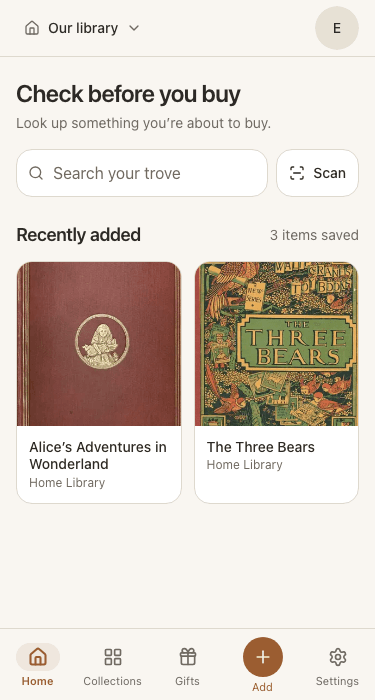
Try a search at home first using a title or author you just added. Then use the same check in a bookstore, thrift shop, library sale, or book fair. Open Our Trove on your phone and search before buying. If a book appears, open its details to compare the copy or edition you already own.
Good to know: No result is only a catalog check, not proof that the book is new to your shelves. Try a shorter title or the author's name, and remember which shelves you have not entered yet. Keep an internet connection available for searches.
Keep it useful with one small habit
Add a new book before it disappears onto a shelf. When you give a book away, remove its record. If you rearrange your shelves, update any location notes you rely on. A smaller, current catalog is more useful than a detailed list you no longer trust.
Your first-shelf checklist
- Every book has a recognizable title and author.
- Notes distinguish copies when an edition matters.
- A search finds a book you know you entered.
- You know which shelves are still missing.
Common questions
What details should I record for each book?
Start with the title and author. Add a collection or shelf location if it helps you find the copy. An ISBN is useful when available; notes about editions or translations matter when you want to distinguish copies. Extra detail is worthwhile only if you will use it later.
Can I catalog books without barcodes?
Yes. Type the title and author, using the book's title page as your reference. In Our Trove, choose Add without photo in a Books collection. You can save a book without a photo or an ISBN.
Do I need to finish my entire library first?
No. A small, clearly scoped catalog can already help you shop. Start with the shelf or collection you are most likely to buy duplicates from. Treat a missing search result cautiously until the rest of the library is entered.
Is a spreadsheet enough for a home library?
Yes, especially if you are comfortable maintaining one. Use columns for title, author, location, and optional ISBN or edition notes, and make sure you can search it from your phone. A catalog app is another option when you want barcode entry and photos alongside the records.
Can I start a book catalog for free in Our Trove?
Yes. The Free plan includes manual book entry and ISBN barcode scanning, with two collections and up to 25 items per collection. Start with a small group of books; paid plans offer more room and catalog export. Your catalog is private to your household and the people you choose to invite.